
Best Seller 100% online course
PLC Programmer Course
Become an expert! Learn from scratch to develop applications from basic to advanced level and secure an opportunity in the job market.
 Created by Filippo Maselli
Last updated 05/2026
English
Created by Filippo Maselli
Last updated 05/2026
English
What you will learn
- Learn everything about the PLC from scratch.
- Understand the history, evolution, why and where to use PLCs in industry.
- Understand the industrial control system and its main components.
- Learn everything about PLC hardware, such as inputs, outputs and electrical wiring.
- The main electrical connections between field instruments and the PLC.
- How field devices relate to PLC programming.
- Main programming elements of the Ladder language.
- Learn and practice programming a PLC using the Ladder language.
- Get to know and develop control logic with the main PLC instructions.
- Develop a real project from scratch, getting to know the main technical documents.
- Get to know all the stages of an industrial automation project.
How the online course works
You study online, on FM4's e-learning platform, from home.
- 1EnrollOnce your payment is approved, platform access is granted instantly.
- 2Study from anywhereOn your phone, tablet, laptop or desktop, 24 hours a day, 7 days a week.
- 3At your own paceRecorded lessons, no fixed schedule, with 1-year platform access.
- 4Support and certificateAsk the instructor your questions through student support and get a digital certificate when you finish.
Course content
9 modules · 138 topics · 34h of video
01 PLC Fundamentals 11 topics
- What a PLC Is
- History and Evolution of Automation
- Why Use a PLC
- What the Advantages of a PLC Are
- Main PLC Manufacturers
- Where the PLC Is Used
- Control Systems
- Main Control Elements
- PLC Architecture
- PLC Classification
- Types of PLC (Compact and Modular)
02 PLC Hardware 34 topics
- PLC Architecture
- PLC Classification
- Types of PLC (Compact and Modular)
- Input and Output Devices
- Analog vs. Digital Variables
- Digital Inputs
- Multi-Bit Input
- Analog Input
- Digital Output
- Multi-Bit Output
- Analog Output
- Input Wiring
- What Sink vs. Source Is
- What an NPN vs. PNP Sensor Is
- What a Normally Open vs. Normally Closed Contact Is
- Output Wiring
- What Relay vs. Triac vs. Transistor Is
- Practical Exercises (Wiring)
- PLC Location and Installation
- What a Sensor, Transducer and Transmitter Are
- What Passive and Active Instruments Are
- What Passive and Active Analog Inputs Are
- Wiring a 4-Wire Transmitter
- Wiring a 3-Wire Transmitter
- Wiring a 2-Wire Transmitter
- Introduction to Electrical Controls
- Difference between Power and Control Circuits
- Main Components of Electrical Controls
- Electrical Controls vs. PLC
- Motor Starting - Direct-On-Line Starter
- Motor Starting - Star-Delta Starter
- Motor Starting - Soft Starter
- Motor Starting - Variable Frequency Drive (VFD)
- Manual / Automatic Concept
03 Programming the PLC (Basic) 14 topics
- Field Devices vs. Programming
- Electrical Controls vs. Ladder Language
- Types of Programming Languages
- Main Ladder Elements
- Programming in Ladder
- Practical Exercises (Ladder)
- Operating Modes (Program vs. Run)
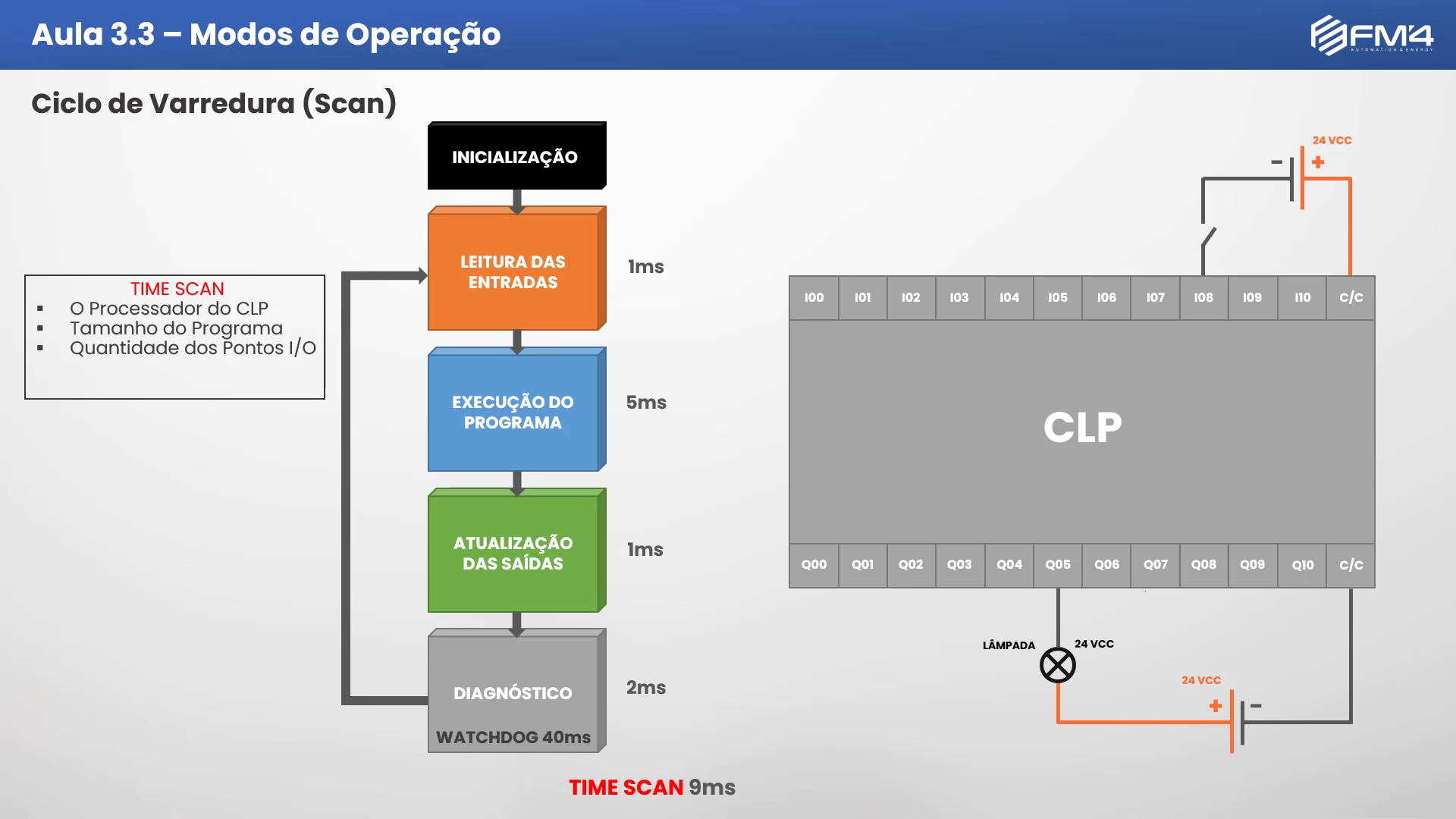
- Scan Cycle
- Watchdog Timer
- Downloading and Installing the Programming Software
- Getting to Know the Programming Software
- Data Types BIT, BOOL, BYTE, WORD, DWORD
- Data Types USINT, SINT, UNIT, INT
- Data Types - UDINT, DINT, FLOAT/REAL
04 Programming the PLC (Intermediate) 17 topics
- Getting to Know the IEC 61131 Standard
- What Configuration, Resources and Tasks Are
- What Programs and POUs Are
- What a Function and a Function Block (FB) Are
- What Local and Global Variables Are
- What Non-Retentive and Retentive Variables Are
- What a Persistent Variable Is
- What Direct and Indirect Representation Variables Are
- Top-Down and Bottom-Up Concept
- Program Modeling and Structuring
- Ladder (Contact Logic)
- Ladder (Seal-In Logic)
- Ladder (Set and Reset Instruction)
- Ladder (Set Dominant)
- Ladder (Reset Dominant)
- Ladder (Rising Edge Instruction)
- Ladder (Falling Edge Instruction)
05 Programming the PLC (Advanced) 24 topics
- Ladder (MOVE Instruction)
- Ladder (TON Timer Instruction)
- Ladder (TOF Timer Instruction)
- Ladder (TP Timer Instruction)
- Ladder (CTU Counter Instruction)
- Ladder (CTD Counter Instruction)
- Ladder (CTUD Counter Instruction)
- Ladder (AND Boolean Instruction)
- Ladder (NAND Boolean Instruction)
- Ladder (OR Boolean Instruction)
- Ladder (XOR Boolean Instruction)
- Ladder (NOT Boolean Instruction)
- Ladder (ADD Addition Instruction)
- Ladder (SUB Subtraction Instruction)
- Ladder (MUL Multiplication Instruction)
- Ladder (DIV Division Instruction)
- Ladder (EQ Comparison Instruction)
- Ladder (NE Comparison Instruction)
- Ladder (LT Comparison Instruction)
- Ladder (LE Comparison Instruction)
- Ladder (GT Comparison Instruction)
- Ladder (GE Comparison Instruction)
- Ladder (Normalization Instruction)
- Ladder (Scaling Instruction)
06 Automation Project Schedule 13 topics
- Presenting the Project
- Project Scope
- Getting to Know the Phases of an Automation Project
- Internal Phase (Project Sizing)
- Internal Phase (Factory Acceptance Test)
- External Phase (Infrastructure Assembly)
- External Phase (Assembly and Installation)
- External Phase (Cable Pulling)
- External Phase (Electrical Termination)
- External Phase (Commissioning)
- External Phase (Start-Up)
- External Phase (Site Acceptance Test)
- External Phase (Assisted Operation)
07 Automation Technical Documentation 15 topics
- Document (Project Schedule)
- Document (Functional Description)
- Document (Operation Manual)
- Document (I/O List)
- Document (Interconnection Diagram)
- Document (Cause and Effect Matrix)
- Document (Logic Diagram)
- Document (Network Architecture)
- Document (Communication Map)
- Document (Process Flow Diagram)
- Document (Alarm and Setpoint List)
- Document (Instrument List)
- Document (Cable List)
- Document (Data Sheet)
- Document (Loop Diagram)
08 Final Project Development 3 topics
- Presenting the Project
- Project Scope
- Project Development
09 Fault Analysis and System Maintenance 7 topics
- Tips for Organizing and Structuring the Logic
- Tools and Techniques for Fault Analysis
- Using Cross Reference
- Using Trace (Chart Generation)
- Using the Program Comparator
- Using the Variable Watch List
- Using the Force and Unforce Values Tool
Course images
About the course
The PLC Programmer Course will take you from zero to advanced understanding.
The course is therefore recommended for people who want to enter the industrial automation field and for professionals who already work in it.
In the First Module, you will learn what a PLC is, what automation is, where it is used, control systems, what the job market looks like and what knowledge you need to become a well-rounded professional. We will take you by the hand and show you the path to becoming a well-rounded professional. Don't worry!
In the Second Module, you will learn what most PLC courses don't teach: the electrical wiring of inputs and outputs. You will also understand how PLC architecture and classification work, input and output devices, and work through many practical exercises.
In the Third Module, you will learn to program control logic. For programming, we will use MasterTool IEC XE, Altus's programming software, which you can download for free. We will use the Nexto Xpress PLC from Altus. This PLC is based on the IEC 61131 standard, which standardizes the major PLC manufacturers. This means everything you learn in this course will help you program any PLC on the market. The concept is the same. Programming will be based on the Ladder language, the most widely used in the world. You will learn more than 20 programming instructions, such as timing, counting, assignment, math calculations, comparators and more. There are more than 20 practical programming exercises.
In the Fourth Module, with all the knowledge you have gained, we will build a final project based on a real situation. You will get to know all the stages of an automation project, from the commercial stage through pre-design, commissioning, testing and project delivery. And after delivery, we share tips for organizing and maintaining an automation system. The complete syllabus is listed below. Our content is the most complete in Brazil. You will have 12 months of access to the learning platform.
Requirements
Basic knowledge of the Windows operating system and electrical systems is required.
Who this course is for
This course is designed for electricians, engineers and technicians with a background in electrical engineering, electrical work, electronics, automation, instrumentation, mechanics, telecommunications, mechatronics, production or any field that involves automation.
Your instructor
Filippo Maselli Pezzino
Control and Automation Engineer
- 2,100 Students
- 4 Courses
Instructor Filippo Maselli Pezzino holds a degree in Control and Automation Engineering from Universidade Gama Filho (UGF) and a postgraduate degree in Quality and Productivity. He has experience in Oil & Gas, building automation and packaging machinery, with skills in programming PLCs, HMIs, SCADA systems and more.
I will help you earn your professional qualification by sharing all my knowledge of PLC Programming, just as I have done for 2,000+ students in our courses.
Certificate of completion
After completing the PLC Programmer Course, you will receive a digital Certificate of Completion.
// about FM4
Why study with FM4
Since 2020, FM4 Automation & Energy has trained professionals for the industrial automation sector. More than 2,000 students have been trained with online courses created by people who work in the industry.
Here you go beyond theory: lessons are based on real projects and situations, so you are ready for everyday challenges.
- +2.000 students trained since 2020
- Study whenever you want Access 24/7, at your own pace.
- Full HD lessons High-quality recorded video lessons so you can see every detail on screen.
- Support from engineers Get individual, specialized technical support.
- Real projects Courses based on real industry projects and experience.
- Certificate of completion Digital certificate when you complete each course.
// comparison
Traditional Training x FM4 Training
// reviews
What our students say
I bought all of Professor Filippo's courses because, without a doubt, his teaching is the best I have ever seen. If you are unsure, you can be certain you will not find more complete and easier-to-follow content than this.
 Tiago TeodoroIndustrial Automation Technician
A complete, high-quality platform. The course is easy to follow, makes you want to keep learning and is never boring, plus there are topics available when you need help.
 Rafael LucheriniIndustrial Instrumentation Technician
It made a real difference in my professional life, because it helps me every day in the field I work in.
 Gleison RibeiroElectrotechnical Technician
The course positively surprised me. I thought it would only cover programming itself, but the content went much further: electrical wiring, troubleshooting tips and how to structure projects, plus the main topic, Ladder programming. It was well worth the investment.
 Jefferson MotaPLC and HMI Programmer
I highly recommend this course bundle: the courses complement each other and are very easy to follow. It is truly a course for learning, with no filler. By dedicating myself to the lessons I really learned, and today I can program, which I could not do after other courses!
 Márcio da SilvaElectrotechnician
The courses are objective and the module content meets the needs of anyone looking for quality automation training. The instructor answers quickly, and navigating the platform is simple and efficient.
 Marcelo MoreiraOperations Technician
// faq
Questions about the course
PLC Programmer Course in a nutshell...
The PLC Programmer Course will take you from zero to advanced understanding of PLC-based programming, hardware, technical documentation and projects. All lessons are pre-recorded in FULL HD quality.
Is there a time limit on the course?
Yes. The PLC Programmer Course gives you access to the learning platform for one (1) year.
Can I access the course from anywhere?
Yes! The FM4 online learning platform works on all devices: smartphone, tablet, laptop, desktop and more. It is also cross-browser, meaning it works in every web browser.
Does the course have a fixed schedule?
No, you can access your course whenever you have time. The course is available 24 hours a day, 7 days a week, ready whenever you are. You set your own pace of study.
What support options are available?
The FM4 platform is currently one of the most complete. You can use the Q&A Forum inside the learning platform. The instructor will reply within two (2) days.
What are the support hours?
Support is available from 9 a.m. to 6 p.m. The instructor will reply within two (2) days.
How do I access the course?
When enrollment opens and your purchase is confirmed, you will receive an email to create your password. Then you can access the learning platform through the “Student area” button at the top of the website.
Is a Certificate of Completion issued?
Yes. At the end of the course we issue a certificate of completion with the course name, course hours, date and instructor name.
Is the certificate valid?
Yes. All certificates issued by FM4 are valid as proof of the course hours completed. The MEC (Brazil's Ministry of Education) is only responsible for authorizing technical, undergraduate and graduate programs. Open courses are not classified as undergraduate, graduate or vocational technical programs. Our courses are open continuing education/qualification courses: under Law No. 9,394 (Brazil's National Education Guidelines and Framework Law), open courses became part of Professional Education as Basic-Level Professional Education. They are a non-formal type of education of variable length, designed to give workers the knowledge they need to retrain, qualify and keep up to date for work. No prior schooling is required.
What is the course guarantee?
You have a guarantee of up to 7 days. If for any reason you want your money back, we will refund it in full. We only ask for the reason for the refund so we can improve our services.
// get started
PLC Programmer
$149 USD · Enrollment opens soon. Join the waitlist and be the first to know.