PLC stands for Programmable Logic Controller, an electronic device used to automate industrial and residential processes…
Filippo MaselliControl and Automation Engineer 6 min read
What is a PLC?
Learn everything about PLCs in our complete online course.
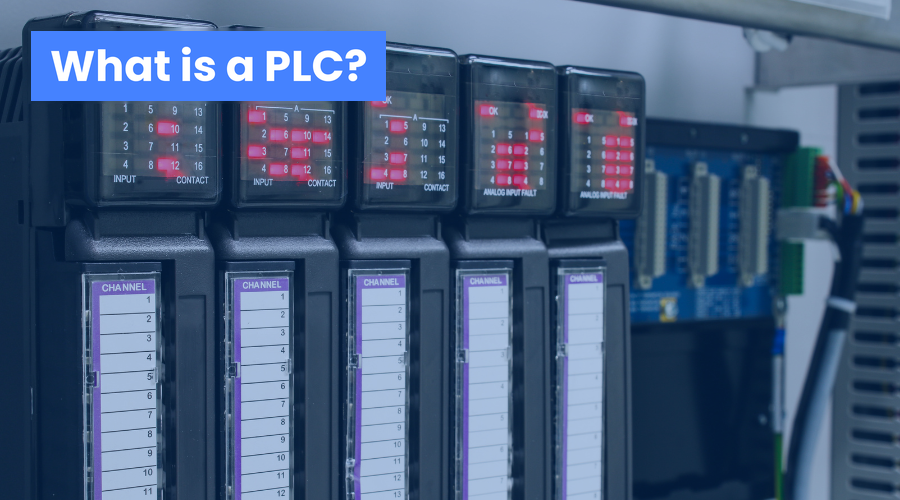
PLC stands for Programmable Logic Controller, an electronic device used to automate industrial, residential or Internet of Things (IoT) processes. The PLC receives input signals from sensors, processes those signals according to a predefined program and sends output signals to actuators, such as motors, valves, relays, etc. In this way, the PLC controls the operation of machines and equipment, ensuring efficiency, safety and quality in production.
How does a PLC work?
A PLC is made up of three main parts:
A power supply, which provides the voltage the PLC needs to operate;
A central processing unit (CPU), which is the brain of the PLC, responsible for running the program and performing logical and arithmetic operations;
An input/output (I/O) unit, which is the PLC's interface with the process, responsible for receiving input signals and sending output signals.
The operation of a PLC can be summarized in the following steps:
The PLC reads the input signals from the sensors, which can be analog or digital, and converts them into numeric values;
The PLC runs the program, which is a sequence of instructions written in a PLC-specific programming language, such as Ladder, FBD, STL, etc. The program defines the control logic of the process, that is, the conditions and actions the PLC must carry out;
The PLC sends the output signals to the actuators, which can be analog or digital, and converts them into physical values, such as voltage, current, etc. The output signals drive the actuators, which perform the process control actions, such as starting or stopping a motor, opening or closing a valve, etc.
Why take a PLC programmer course?
The PLC is a fundamental technology for industrial automation, because it makes it possible to control complex, variable and dynamic processes quickly, accurately and flexibly. PLCs can be applied in many sectors, such as energy, water, gas, oil, metallurgy, chemicals, pharmaceuticals, food, automotive, etc.
To become a PLC programmer, you need to learn about electricity, electrical controls, drives and PLC-specific programming languages. You also need to understand the process you want to automate, the variables involved, the available sensors and actuators, the safety and quality requirements, and so on.
A PLC programmer course can teach you all of this in a practical, easy-to-follow way, with real examples and exercises. A PLC programmer course can qualify you to work in many industries as a programmer, designer, installer, maintenance technician or automation systems supervisor. A PLC programmer course can open up many job and career growth opportunities for you.
Where to take a PLC Programmer Course?
If you are interested in taking a PLC programmer course, we have a great tip for you: the PLC Programmer course from FM4 Training. It is an online course that you can take at your own pace, on your own schedule and from anywhere. The FM4 Training PLC Programmer course has a workload of 40 hours, divided into 04 modules, covering the following topics:
Module 01 – Introduction to Industrial Automation
What is a PLC
History and Evolution of Automation
Why Use a PLC
What Are the Advantages of a PLC
Main PLC Manufacturers
Where PLCs Are Used
Control Systems
Main Control Elements
Automation Examples
Open Control Loop
Closed Control Loop
Automation Pyramid
Professional Qualification Tips
Job Market and Openings
Module 02 – PLC Hardware
PLC Architecture
PLC Classification
Types of PLC (Compact and Modular)
Input and Output Devices
Analog vs. Digital Variables
Digital Inputs
Multi-Bit Input
Analog Input
Digital Output
Multi-Bit Output
Analog Output
Input Wiring
What Is Sink vs. Source
What Is an NPN vs. PNP Sensor
What Is a Normally Open vs. Normally Closed Contact
Output Wiring
What Is Relay vs. Triac vs. Transistor
Practical Exercises (Wiring)
PLC Location and Installation
What Are Sensors, Transducers and Transmitters
What Are Passive and Active Instruments
What Are Passive and Active Analog Inputs
Wiring a 4-Wire Transmitter
Wiring a 3-Wire Transmitter
Wiring a 2-Wire Transmitter
Introduction to Electrical Controls
Difference Between Power and Control Circuits
Main Electrical Control Components
Electrical Controls vs. PLC
Motor Starting – Direct-On-Line Start
Motor Starting – Star-Delta Start
Motor Starting – Soft Starter
Motor Starting – Variable Frequency Drive
Manual / Automatic Concept
Module 3 – PLC Programming
Field Devices vs. Programming
Electrical Controls vs. Ladder Language
Types of Programming Languages
Main Ladder Elements
Programming in Ladder
Practical Exercises (Ladder)
Operating Modes (Program vs. Run)
Scan Cycle
Watchdog Timer
Downloading and Installing the Programming Software
Getting to Know the Programming Software
Data Types BIT, BOOL, BYTE, WORD, DWORD
Data Types USINT, SINT, UNIT, INT
Data Types – UDINT, DINT, FLOAT/REAL
Getting to Know the IEC 61131 Standard
What Are Configuration, Resources and Tasks
What Are Programs and POUs
What Are Functions and Function Blocks (FB)
What Are Local and Global Variables
What Are Non-Retentive and Retentive Variables
What Is a Persistent Variable
What Are Directly and Indirectly Represented Variables
Top-Down and Bottom-Up Concepts
Program Modeling and Structuring
Ladder (Contact Logic)
Ladder (Seal-In Logic)
Ladder (Set and Reset Instructions)
Ladder (Set-Dominant)
Ladder (Reset-Dominant)
Ladder (Rising Edge Instruction)
Ladder (Falling Edge Instruction)
Ladder (MOVE Instruction)
Ladder (TON Timer Instruction)
Ladder (TOF Timer Instruction)
Ladder (TP Timer Instruction)
Ladder (CTU Counter Instruction)
Ladder (CTD Counter Instruction)
Ladder (CTUD Counter Instruction)
Ladder (AND Boolean Instruction)
Ladder (NAND Boolean Instruction)
Ladder (OR Boolean Instruction)
Ladder (XOR Boolean Instruction)
Ladder (NOT Boolean Instruction)
Ladder (ADD Addition Instruction)
Ladder (SUB Subtraction Instruction)
Ladder (MUL Multiplication Instruction)
Ladder (DIV Division Instruction)
Ladder (EQ Comparison Instruction)
Ladder (NE Comparison Instruction)
Ladder (LT Comparison Instruction)
Ladder (LE Comparison Instruction)
Ladder (GT Comparison Instruction)
Ladder (GE Comparison Instruction)
Ladder (Normalization Instruction)
Ladder (Scaling Instruction)
Module 04 – PLC Programming
– Presenting the Project
– Project Scope
– Getting to Know the Phases of an Automation Project
– Internal Phase (Project Sizing)
– Internal Phase (Factory Acceptance Test)
– External Phase (Infrastructure Assembly)
– External Phase (Assembly and Installation)
– External Phase (Cable Pulling)
– External Phase (Electrical Termination)
– External Phase (Commissioning)
– External Phase (Start-Up)
– External Phase (Site Acceptance Test)
– External Phase (Assisted Operation)
- Getting to Know the Main Technical Documents
– Document (Project Schedule)
– Document (Descriptive Memorandum)
– Document (Operation Manual)
– Document (I/O List)
– Document (Interconnection Diagram)
– Document (Cause and Effect Matrix)
– Document (Logic Diagram)
– Document (Network Architecture)
– Document (Communication Map)
– Document (Process Flow Diagram)
– Document (Alarm and Setpoint List)
– Document (Instrument List)
– Document (Cable List)
– Document (Data Sheet)
– Document (Loop Diagram)
– Project Development
– Tips for Organizing and Structuring the Logic
– Tools and Techniques for Troubleshooting
– Using Cross Reference
– Using Trace (Charting)
– Using the Program Comparator
– Using the Variable Watch List
– Using the Force and Unforce Values Tool
The FM4 Training PLC Programmer course includes high-quality learning materials made up of videos, simulators and software. The FM4 Training PLC Programmer course also includes specialized technical support, which answers all your questions and helps you along your learning journey. The FM4 Training PLC Programmer course also provides a certificate of completion, recognized throughout Brazil.
If you want to become a PLC programmer, don't miss this opportunity. Visit the FM4 Training website and enroll. You will learn everything about PLCs in an easy, fast and efficient way. You will become qualified for the job market and stand out in the industrial automation field. You will be surprised by what PLCs can do for you.
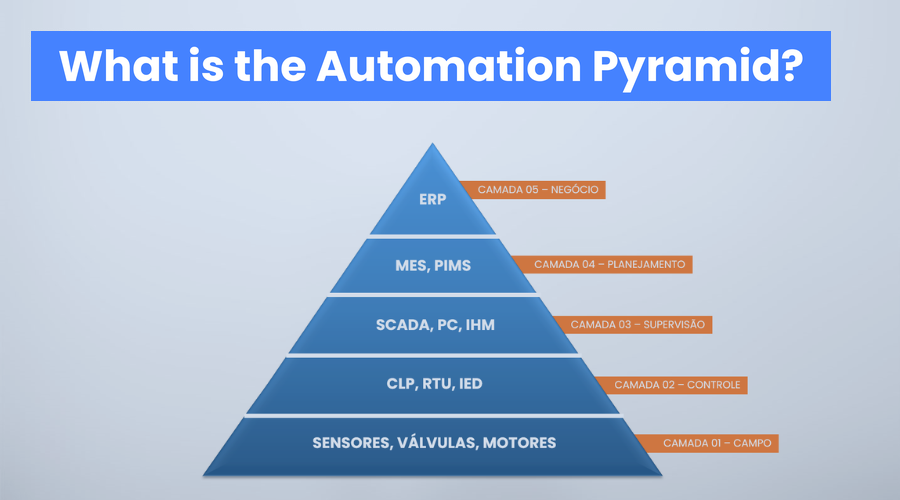
The industrial Automation Pyramid is a visual representation that organizes the different layers of systems and technologies used to automate industrial processes.

 Filippo MaselliControl and Automation Engineer
6 min read
Filippo MaselliControl and Automation Engineer
6 min read